How to embed a GeoALS app into your site
You can embed a GeoALS app, such as the Clinic Locator or Legislative Viewer, into your website by clicking the Share button in the app, clicking the Embed button, copying the embed code that displays, then pasting it into the HTML of your website. For example:
Go to the Legislative Viewer or Clinic Advisor.
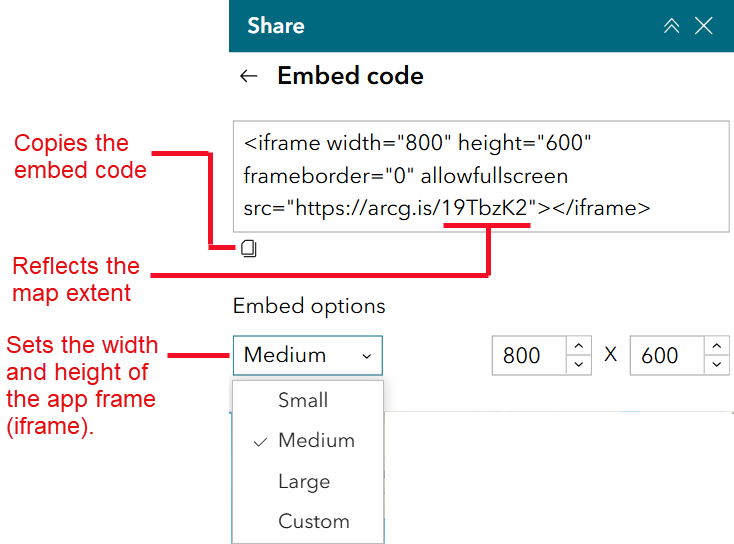
If you’d like the embedded map to have a default extent (location) different from the app’s default extent, zoom and pan until that extent/location is in the map frame. The embed code will reflect the extent.
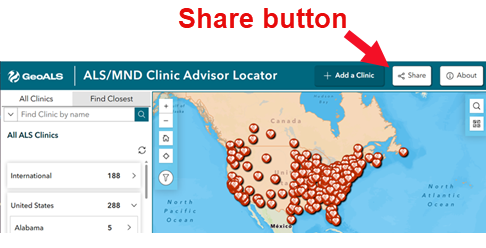
Click the Share button, which displays the Embed button.
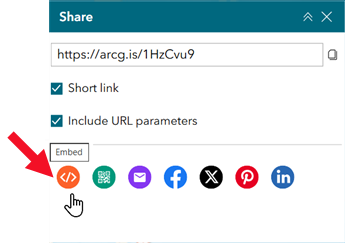
4. Click the Embed button, which displays the embed code.
5. Adjust settings (described in the image below), which change the HTML code. Then click the Copy button to copy the HTML code. Paste the HTML code into your website where you want the app to display. Be sure to test the app on your website and adjust frames and sizing as needed.